A family laughing in a supermarket as they point at a kiosk showing an AI-made Lunar New Year postcard on its touchscreen

AI Games

AI Games

Powerful AI games that bring joy and delight to your customers

Book a demo

AI Games

AI Glow by Pepper

Draw it. Snap it. Glow it.

There are two games in one app. In the AI Drawing Glow Up, a child draws a goat with on-screen crayons and the AI re-creates their very own goat as a toy, an ink painting or a gold sculpture. In the AI Photo Glow Up, you take a selfie and the AI puts you next to a lucky goat, in the scene the brand chooses, such as a Chinese New Year grocery store.

In about 20 seconds the picture lands on a branded postcard with a greeting, the brand’s logo and a QR code. People send it on WhatsApp from their phone, or scan the QR at the kiosk to take it home. Every word and logo comes from the brand’s template. Only the picture is made by AI.

  • About 20 secondsfrom drawing or selfie to postcard
  • Phone or kioska web app, no download, or full-screen in store
  • Ready to shareon WhatsApp, or take it home with a QR code

The games

Two games, one app

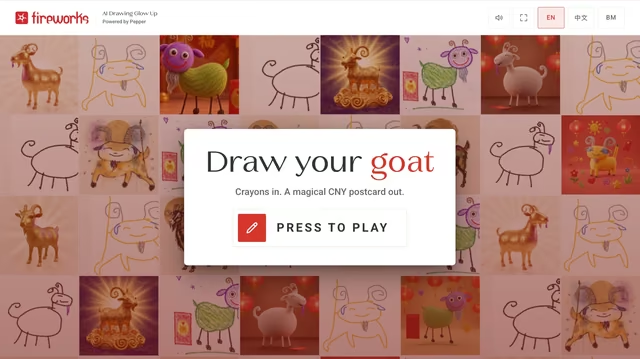
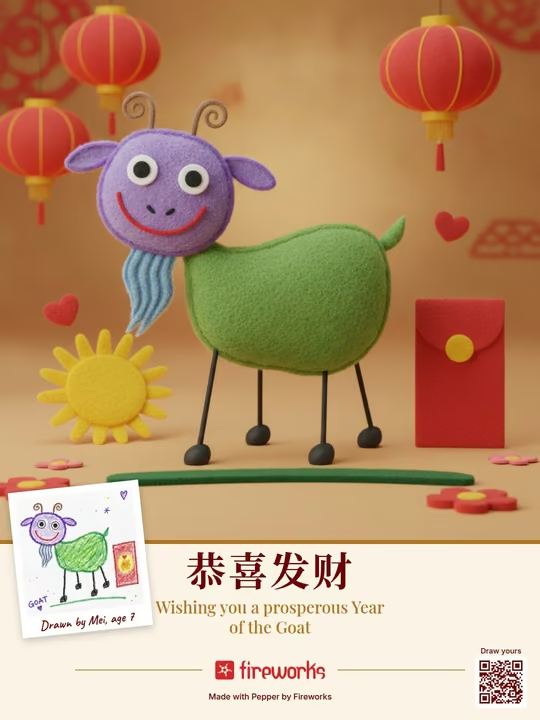
Kiosk attract screen of AI Drawing Glow Up: a mosaic of crayon goats and AI goats with a card that reads Draw your goat, Crayons in, a magical CNY postcard out, and Press to playAI Drawing Glow Up postcard, Playful style: the child’s crayon goat re-created as a cuddly 3D felt toy with lanterns and an ang pow, with the original drawing as a small polaroid

Game 1

AI Drawing Glow Up

Draw a goat with crayons, however badly. AI keeps every wobble and colour and turns it into a toy, an ink painting or a gold sculpture on a CNY postcard.

How it works

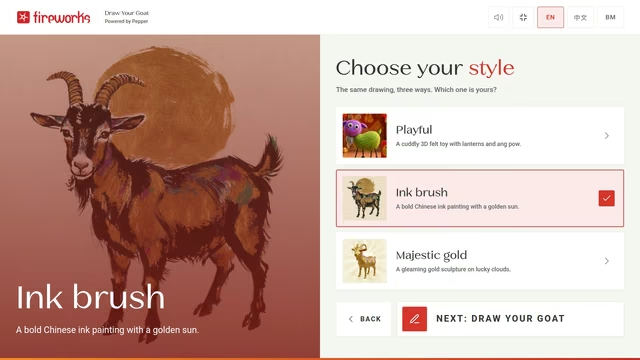
  1. Choose a style. Playful, Ink brush or Majestic gold.

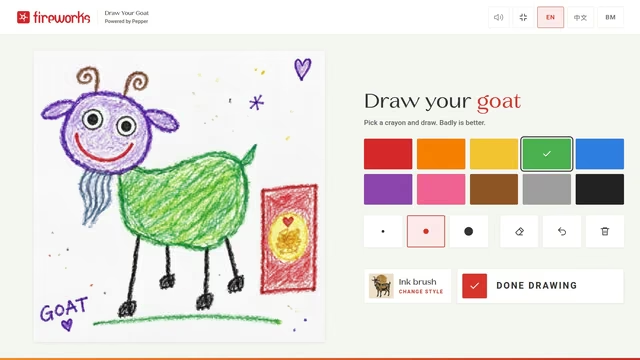
  2. Draw. Crayons on the screen.

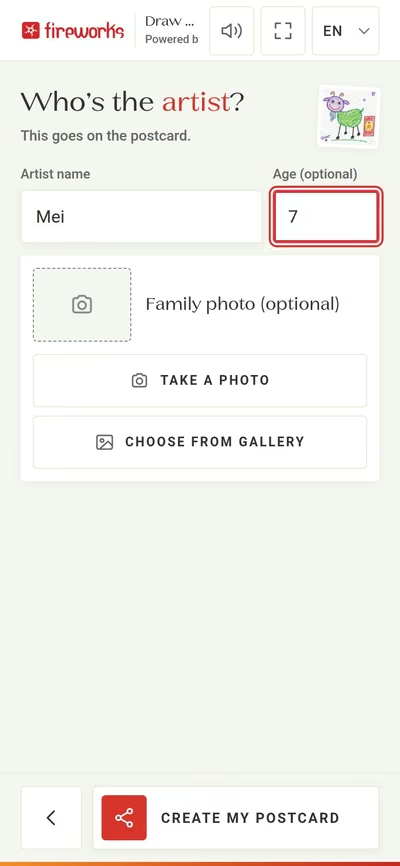
  3. Sign it. Add a name and age, and a family photo if you like.

  4. Glow and share. In about 20 seconds the postcard appears. Send it on WhatsApp, save it, or scan the QR code to take it home.

More about AI Drawing Glow Up

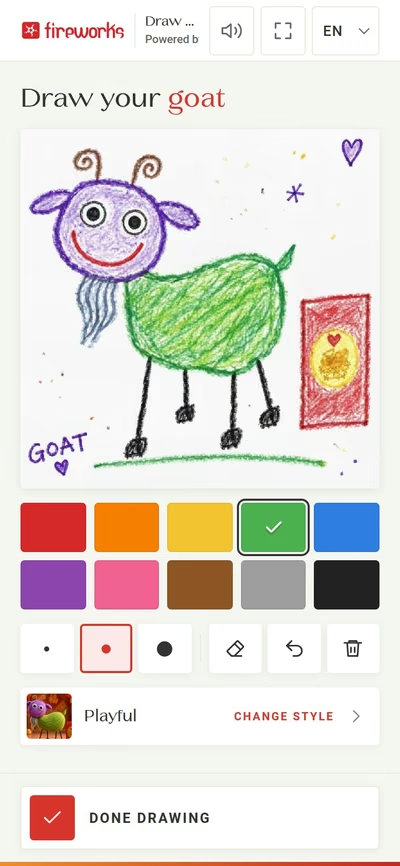
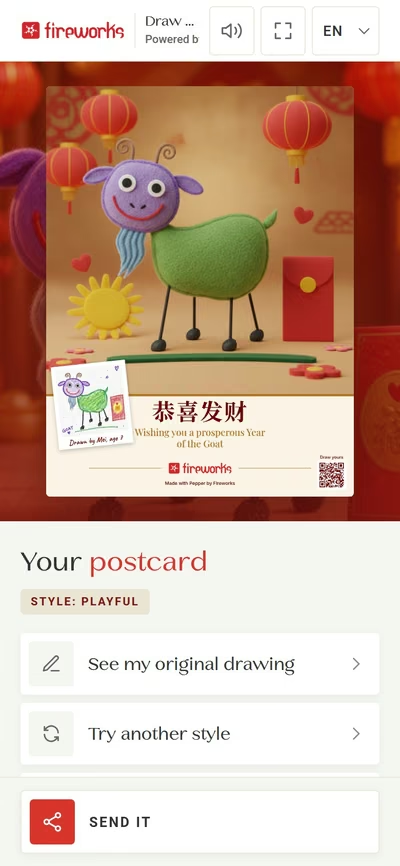
A child picks one of three styles and draws a goat with on-screen crayons (10 colours, 3 sizes, an eraser and undo). They add their name, their age and, if they like, a family photo. In about 20 seconds the AI makes their goat in the chosen style, keeping the pose, the colours and the odd horn, so it is clearly their goat. The goat goes on a branded postcard, with the original drawing as a small polaroid. Not happy with the look? “Try another style” re-uses the same drawing.
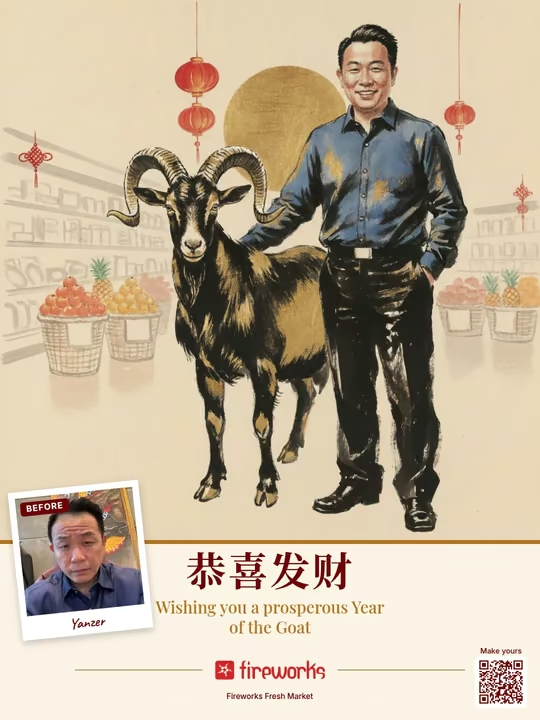
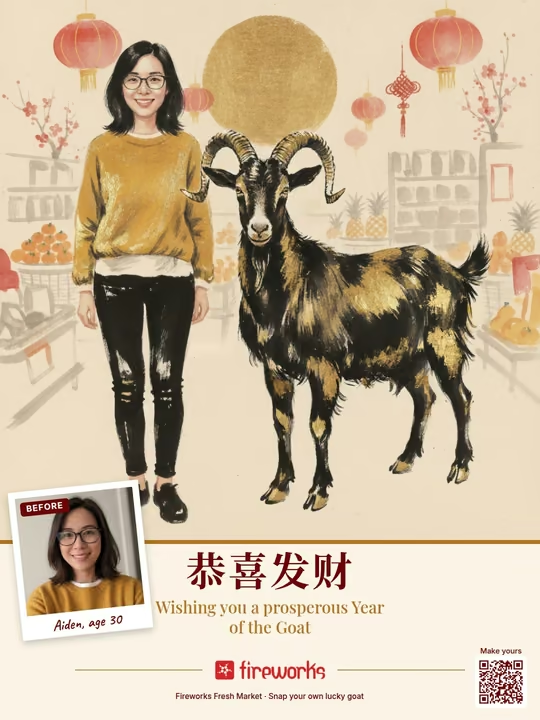
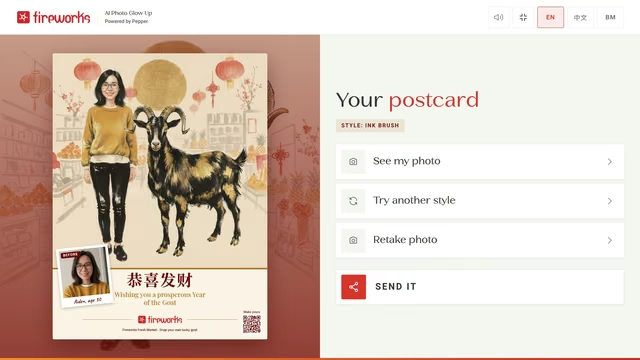
AI Photo Glow Up postcard, Ink brush style: a man standing beside an ink-and-gold goat in a Chinese New Year grocery store, with his selfie as the Before polaroid

Game 2

AI Photo Glow Up

Take a selfie and meet your lucky goat. AI puts you and a goat side by side, in the style you chose, on a CNY postcard.

How it works

  1. Choose a style. Playful, Ink brush or Majestic gold.

  2. Take a selfie. With the camera or from the gallery, then crop it.

  3. Add your name. And tick the consent box.

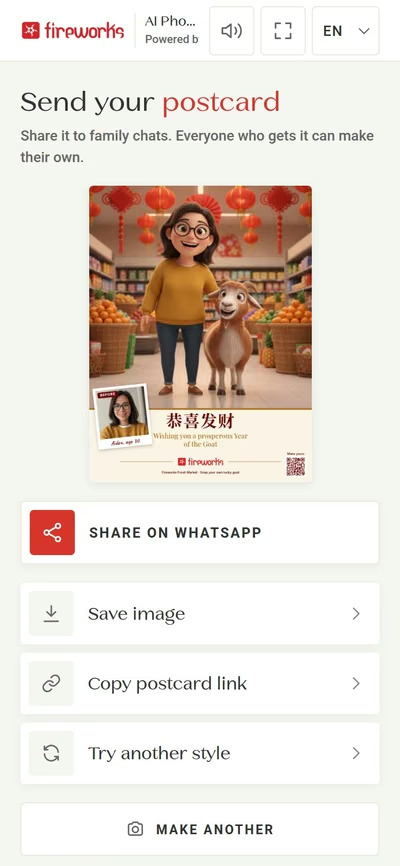
  4. Glow and share. In about 20 seconds you are standing next to a lucky goat on your postcard. Send it on WhatsApp, save it, or scan the QR code to take it home.

More about AI Photo Glow Up

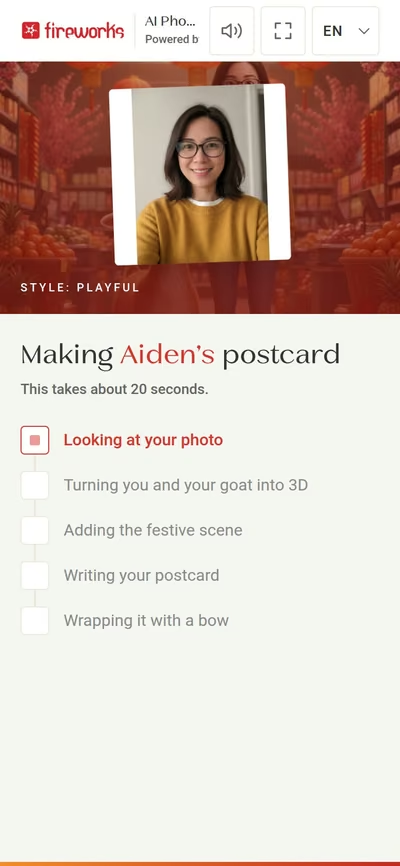
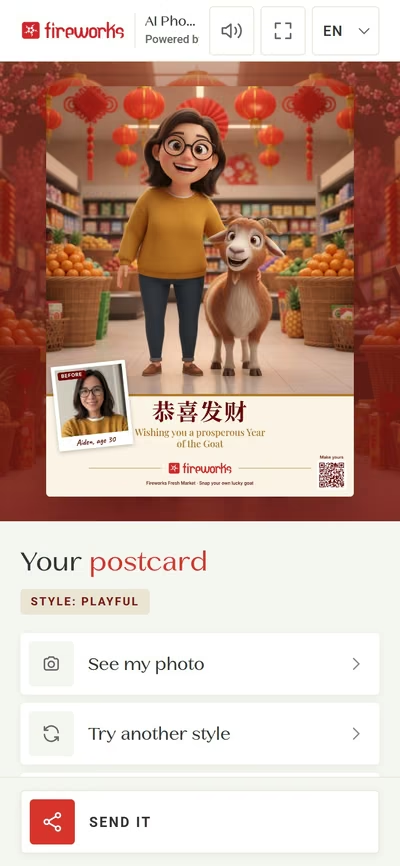
A visitor picks a style, takes a selfie (kiosk camera or upload on a kiosk; phone camera or gallery on a phone) and crops it. They add a name, tick the consent box and tap one button. In about 20 seconds the AI places them standing next to a lucky goat, both in the chosen style. The scene is set by the brand. Our demo campaign is a supermarket dressed for Chinese New Year (lanterns, mandarin oranges), but a campaign can use any scene, such as a mall or a home. The postcard shows the selfie as a “Before” polaroid, so the glow up is clear at a glance.

Ink brush example, made with a photo of our owner. Fireworks Fresh Market is our demo grocer campaign.

The same in both games

Three styles

Pick a look, then glow it. “Try another style” re-uses the same drawing or selfie.

One drawing, three styles

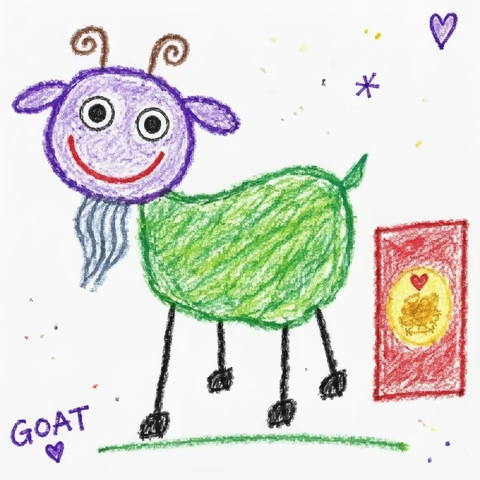
  • A child’s crayon drawing of a purple-headed green goat with a red packet
    Original
  • AI Drawing Glow Up postcard, Playful style: the child’s crayon goat re-created as a cuddly 3D felt toy with lanterns and an ang pow, with the original drawing as a small polaroid
    Playful
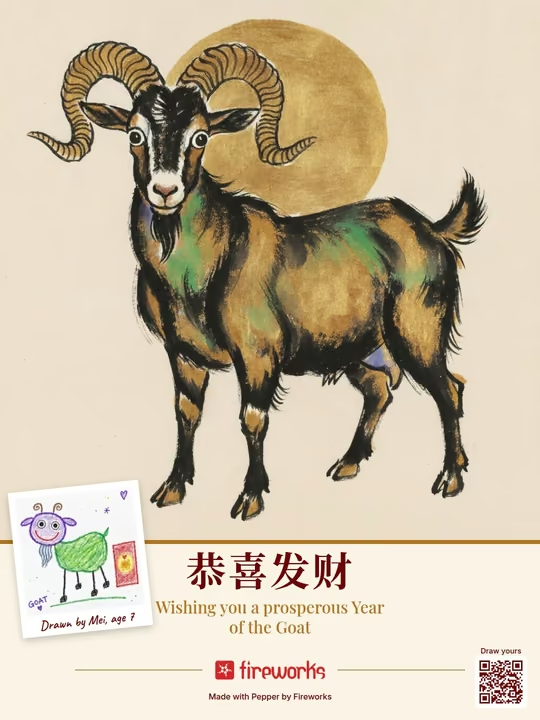
  • AI Drawing Glow Up postcard, Ink brush style: the goat as a bold Chinese ink painting in black and gold with a golden sun
    Ink brush
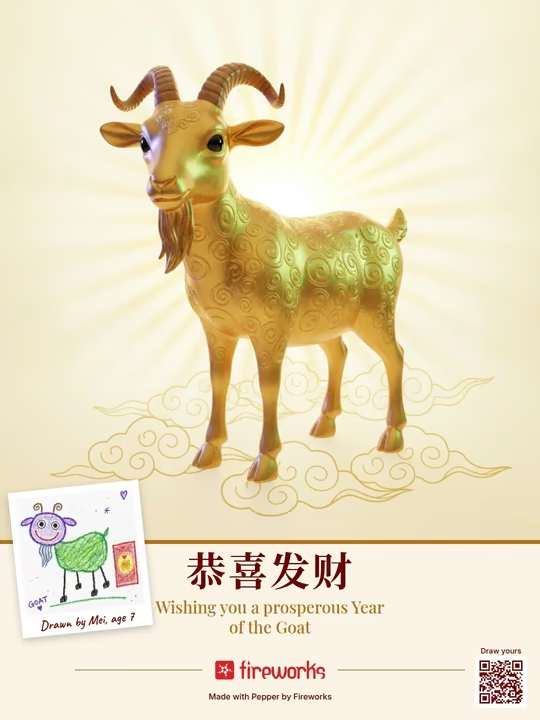
  • AI Drawing Glow Up postcard, Majestic gold style: the goat as a gleaming gold sculpture on lucky clouds
    Majestic gold

One selfie, three styles

  • The sample selfie: a fictional, AI-generated person with glasses and a mustard sweater
    Original
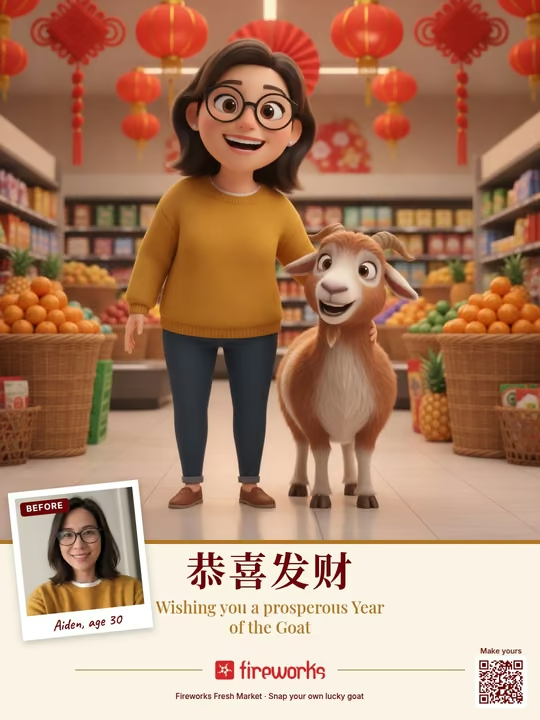
  • AI Photo Glow Up postcard, Playful style: a sample AI-generated person and a lucky goat as 3D animated characters in a Chinese New Year grocery store
    Playful
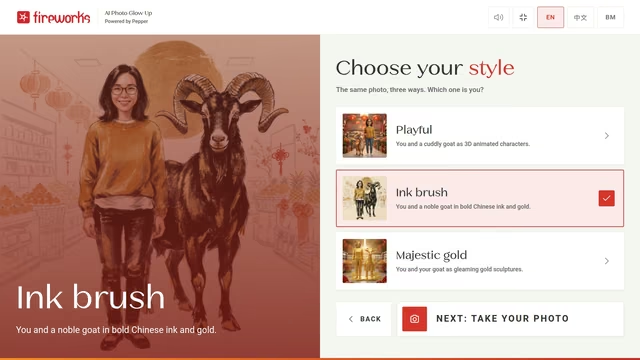
  • AI Photo Glow Up postcard, Ink brush style: the sample person and a noble goat in bold Chinese ink and gold
    Ink brush
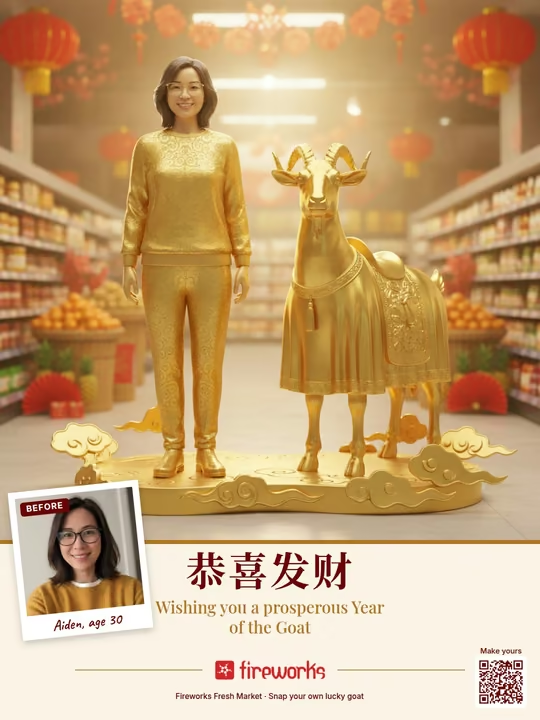
  • AI Photo Glow Up postcard, Majestic gold style: the sample person and the goat as gleaming gold sculptures in a festive grocery store
    Majestic gold

The person in these images is AI-generated, not a real person.

  • Playful

    Drawing game: A cuddly 3D toy look, with lanterns and ang pow.

    Photo game: You and a cuddly goat as 3D animated characters.

  • Ink brush

    Drawing game: A bold Chinese ink painting in black and gold, with a golden sun.

    Photo game: You and a noble goat in bold ink and gold.

  • Majestic gold

    Drawing game: A gleaming gold sculpture on lucky clouds.

    Photo game: You and your goat as gleaming gold sculptures.

Before and after

From a drawing or a selfie to a postcard

  • Before: the crayon drawingAfter: AI Drawing Glow Up postcard, Playful style: the child’s crayon goat re-created as a cuddly 3D felt toy with lanterns and an ang pow, with the original drawing as a small polaroid
    Drawing to Playful
  • Before: the crayon drawingAfter: AI Drawing Glow Up postcard, Ink brush style: the goat as a bold Chinese ink painting in black and gold with a golden sun
    Drawing to Ink brush
  • Before: the crayon drawingAfter: AI Drawing Glow Up postcard, Majestic gold style: the goat as a gleaming gold sculpture on lucky clouds
    Drawing to Majestic gold
  • Before: the sample selfieAfter: AI Photo Glow Up postcard, Playful style: a sample AI-generated person and a lucky goat as 3D animated characters in a Chinese New Year grocery store
    Selfie to Playful
  • Before: the sample selfieAfter: AI Photo Glow Up postcard, Ink brush style: the sample person and a noble goat in bold Chinese ink and gold
    Selfie to Ink brush
  • Before: the sample selfieAfter: AI Photo Glow Up postcard, Majestic gold style: the sample person and the goat as gleaming gold sculptures in a festive grocery store
    Selfie to Majestic gold

Real screens

From first tap to take-home

Screens from the working app, on a phone and on a kiosk. Swipe to see the journey.

AI Drawing Glow Up

On the phone

Phone web app, no download.

  • Phone screen: the crayon canvas with colours, sizes, eraser and undo, and a finished goat drawing
    Draw with crayons
  • Phone screen: Who’s the artist? Name, age and an optional family photo
    Add a name and age
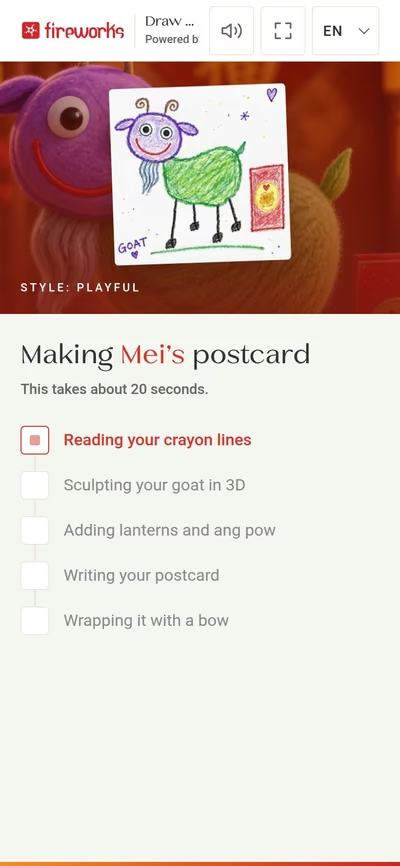
  • Phone screen: the AI is making the postcard, with a checklist of steps
    The AI is making it
  • Phone screen: the finished postcard appears, with See my original drawing, Try another style and Send it
    The postcard appears
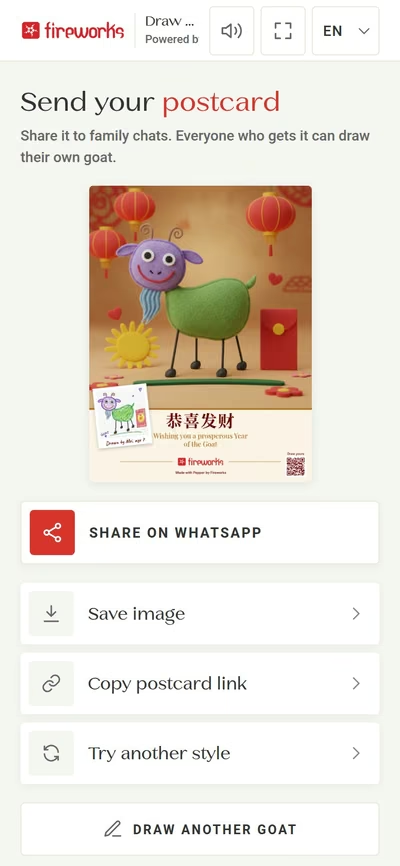
  • Phone screen: Send your postcard. Share on WhatsApp, save image, copy postcard link
    Share, save or copy the link

At the kiosk

Full-screen on a touchscreen kiosk.

  • Kiosk attract screen of AI Drawing Glow Up: a mosaic of crayon goats and AI goats with a card that reads Draw your goat, Crayons in, a magical CNY postcard out, and Press to play
    Attract screen: press to play
  • Kiosk screen: Choose your style. Playful, Ink brush or Majestic gold
    Choose a style
  • Kiosk screen: Draw your goat, with a colour palette, sizes, eraser and undo
    Draw with crayons
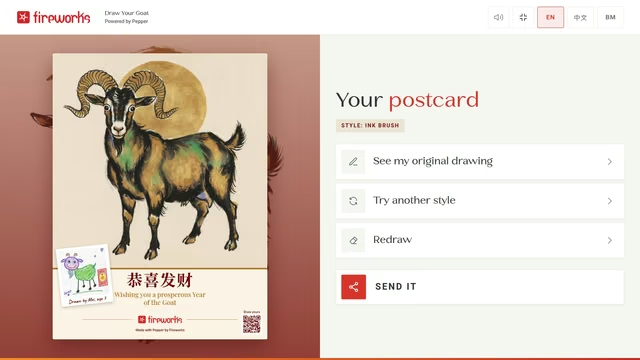
  • Kiosk screen: Your postcard, with See my original drawing, Try another style, Redraw and Send it
    The postcard appears
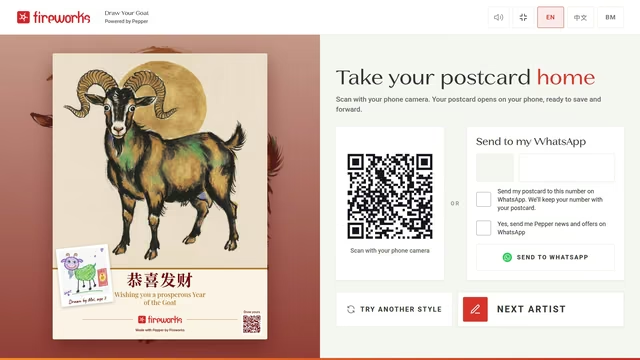
  • Kiosk screen: Take your postcard home, with a QR code to scan and Send to my WhatsApp
    Take it home: QR code or WhatsApp

AI Photo Glow Up

On the phone

Camera or gallery, then crop.

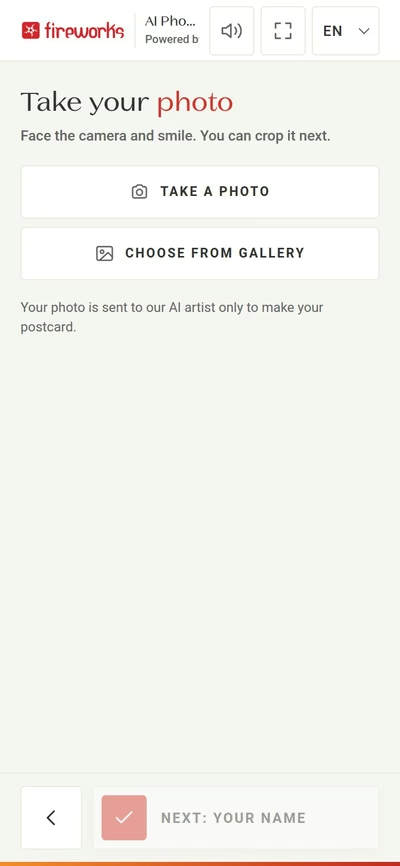
  • Phone screen: Take your photo, with Take a photo and Choose from gallery
    Take a selfie or pick one
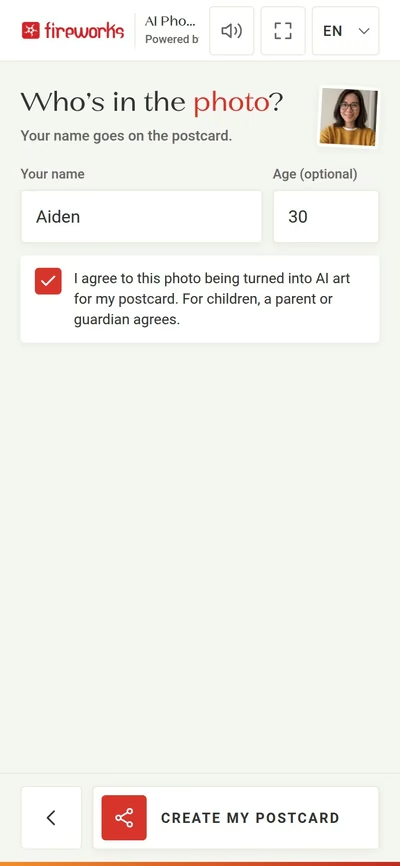
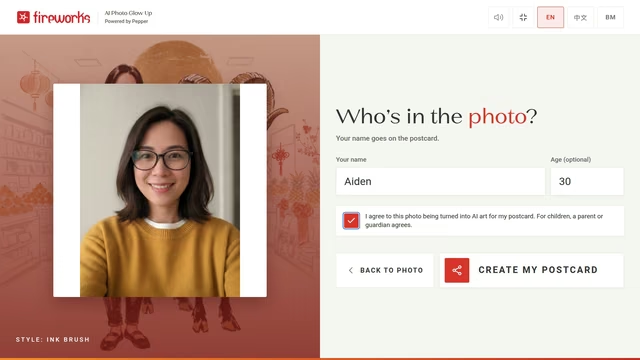
  • Phone screen: Who’s in the photo? Name, age and the consent tick box
    Name, age and consent
  • Phone screen: the AI is making the postcard, with the selfie and a checklist of steps
    The AI is making it
  • Phone screen: the finished postcard appears, with See my photo, Try another style and Send it
    The postcard appears
  • Phone screen: Send your postcard. Share on WhatsApp, save image, copy postcard link
    Share, save or copy the link

At the kiosk

Kiosk camera or upload.

  • Kiosk screen: Choose your style. Playful, Ink brush or Majestic gold
    Choose a style
  • Kiosk screen: Who’s in the photo? Name, age and the consent tick box
    Name and consent
  • Kiosk screen: Your postcard, with See my photo, Try another style, Retake photo and Send it
    The postcard appears
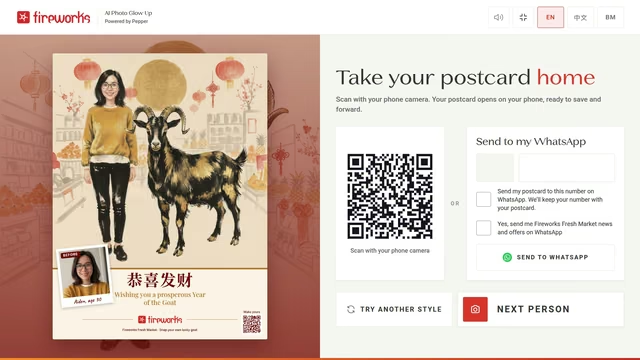
  • Kiosk screen: Take your postcard home, with a QR code to scan and Send to my WhatsApp
    Take it home: QR code or WhatsApp

Features

Everything a campaign needs

  • One app, two places

    A phone web app (no download) and a full-screen kiosk for malls and stores, portrait or landscape, with a full-screen button.

  • Two games, one campaign tool

    The brand chooses the game, the styles and the scene.

  • Three AI styles

    Playful, Ink brush, Majestic gold. “Try another style” re-uses the same drawing or selfie.

  • True to the original

    The drawing game keeps the child’s pose, colours and quirks.

  • Brand-safe postcards

    Every word and logo comes from the brand template. Only the picture is AI.

  • Made for families

    English, 中文 and Bahasa Malaysia. Big touch targets on the kiosk.

  • Festive sound

    Chinese New Year music and sound effects (with a mute button).

  • Safe by design

    Every image is checked automatically, with automatic retries. Consent tick boxes before any photo is used.

  • Easy to take home

    Every postcard has its own page and a QR code. On a kiosk, “Send to my WhatsApp” sends it straight to the visitor’s phone.

  • Brand dashboard

    Per campaign, choose the game and the styles, see the postcard count and export a CSV.

For malls, grocers and brands

A reason to visit, a reason to share

  • Foot traffic with a reason to queue

    A festive, hands-on activity that families line up for at the kiosk.

  • Dwell time and fun

    Kids draw, parents take selfies, everyone stays a little longer in your space.

  • Free word-of-mouth

    Each postcard carries the brand’s logo and a QR code into family WhatsApp groups, so the campaign spreads on its own.

  • Opted-in contacts for the brand

    When someone sends their postcard to their own WhatsApp from the kiosk, they can also tick an optional box to hear from the brand. That builds the brand’s own WhatsApp customer list, with consent, powered by Pepper.

  • Works for any season

    Change the brand, colours, greeting and scene (CNY, Raya, Christmas) without new software.

Draw it. Snap it. Glow it.

Try the demo on your phone or on a kiosk, then talk to us about your campaign.

Book a demo